Build the Whole Ornatrix Stack at Once, and Keep Your Viewport Fast
By Ruxin Liang
Here is a problem every Ornatrix user hits. You start a groom in Maya. You make a fur ball, then add a Surface Comb, then add a Clump. Things are fine. Then you add Curl, Frizz, Detail, and Noise. Now the viewport crawls. Every tweak takes a few seconds to update, and a few seconds add up fast when you are grooming.
The usual fix is to add the heavy operators late. You groom with a short stack, then stack the detail on at the end. It works, but it costs you something. You cannot see the shape you are actually building toward until the very end. So you tune the broad flow, add Clump, find the flow was wrong for clumped hair, and go back and tune it again.
There is another way to do it. Build the whole stack at the start and set the heavy operators to disabled. You get the full stack right away, in the right order, and the viewport stays light. Then you switch the detail on only when you want to look at it.
The order in which the stack should go
The order in which the stack should go
An Ornatrix operator stack evaluates bottom to top, starting at the generator. The order I use goes like this:
| # | Operator | What it does | Starts |
|---|---|---|---|
| 1 | Surface Comb | direction | on |
| 2 | Rotate | direction | on |
| 3 | Clump | shape | off |
| 4 | Curl | shape | off |
| 5 | Frizz | variation | off |
| 6 | Detail | variation | off |
| 7 | Noise | variation | off |
| 8 | Gravity | settle | on |
| 9 | Change Width | render tuning | on |
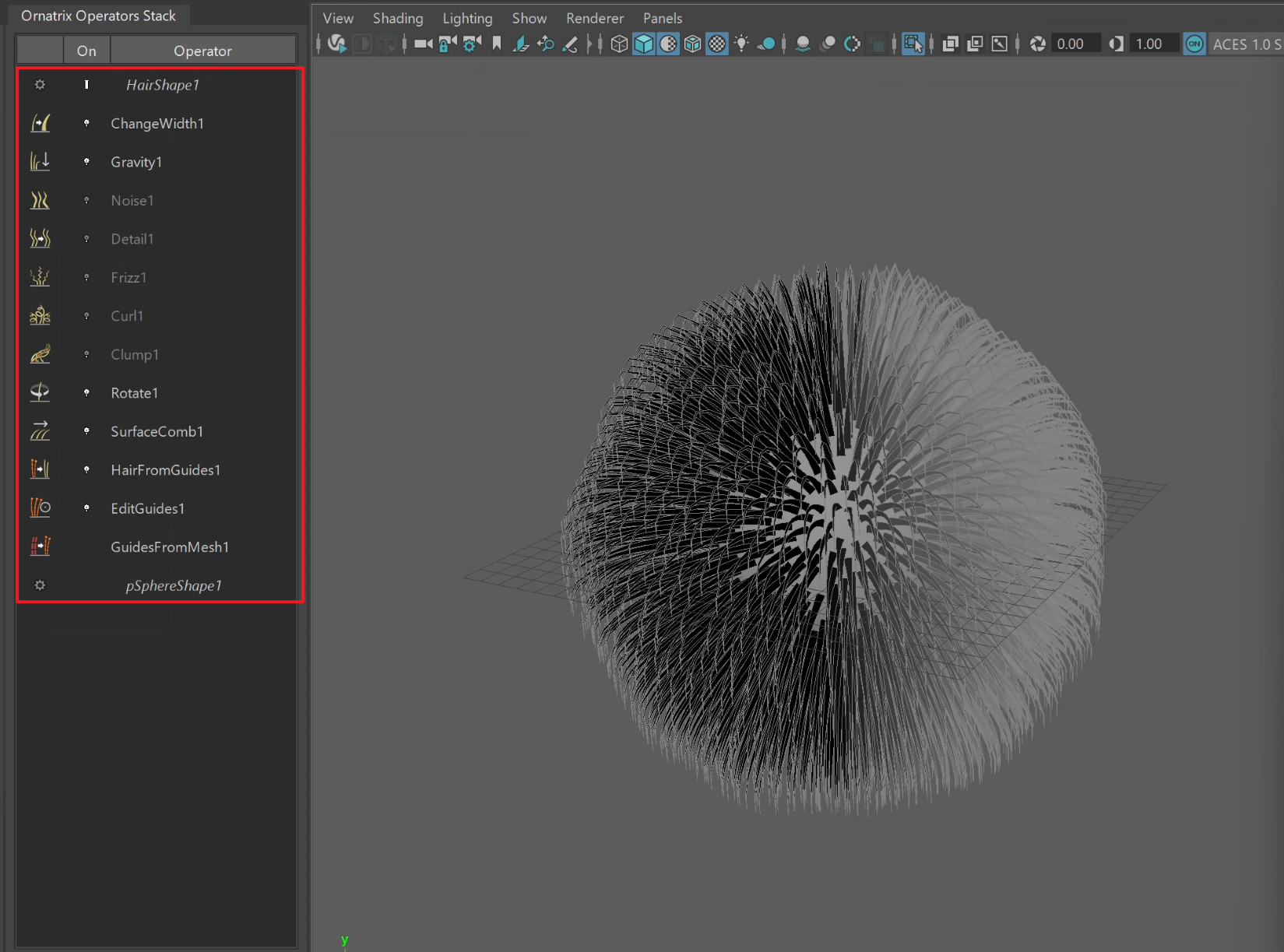
The full stack, built in one go. The Ornatrix stack dialog lists operators top-down, so it reads in reverse: the generator sits at the bottom, and Change Width ends up on top. The five greyed-out names in the middle are the heavy operators, which are disabled. Screenshot by Ruxin Liang.
The idea behind the order is simple. Direction first, then shape, then variation, then settling, then render tuning last. Broad flow at the bottom, fine detail near the top.
One thing to watch for when you read the dialog: it lists the stack top-down, which is the opposite of the order in which it evaluates. The generator is at the bottom of the list and gets evaluated first. Change Width sits at the top and runs last.
Look at which ones start. Surface, Comb, Rotate, and Gravity are the light ones, and they also determine the silhouette. Those stay on. You want to lock the big forms first, and you need to see them to do that. The five in the middle are the expensive ones, and they are all detailed. Detail can wait.
Lever one: turn operators off, the right way
Ornatrix has a checkbox next to each operator in the stack dialog. The command behind it is:
OxEnableOperator "<node>" 0Pass 1 to turn it back on.
Use this command and not a generic nodeState pass-through. Both will stop the operator from evaluating, but only OxEnableOperator keeps the checkbox in the stack dialog in sync. If you use nodeState, the operator is off, and the checkbox still looks on, and you will spend ten confused minutes wondering why Clump does nothing.
Lever two: show fewer strands
The other lever is cheaper still, and it works no matter which operators are on. It is the generator’s view percentage: how many of the strands Maya actually draws in the viewport. Drop it to 5% while you groom; bump it to 50% when you want a proper look. Render counts stay untouched.
There is a catch here that costs people time, so it is worth spelling out. The two generators use two different scales for the same idea:
- Hair from Guides (what a fur ball makes) uses
viewportCountFractionon a 0 to 1 scale. 5% is0.05. - Hair from Mesh Strips uses a 0 to 100 “View Percentage”. 5% is
5.
Set 5 on a fur ball, and you have not asked for 5%; you have asked for 500%, and it will clamp or misbehave depending on your version. Check which generator you are on before you type a number.
Two defaults worth changing on day one
A fur ball built from a scalp mesh in one step. Video by Ruxin Liang.
Fur ball length. Ornatrix makes a new fur ball with long guides. On most character models that come out as a giant hairy ball, you cannot see past it, and the first thing you do is drag the length down. Set a short default instead. I use a guide length of 1.0 and adjust for scene scale.
Strand width. A new fur ball also brings its own Render Settings node, which is one of two places where width gets decided. Two places deciding one thing is how you end up with strands that are fat in the viewport and thin at render. Pick one. I delete the Render Settings node and let a Change Width operator at the top of the stack own it, with a value of 0.05. One node, one answer.
When clumps go bad
One more thing that will bite you. Clumps are built from the groom as they were when you made them. Change something below the Clump operator, like the guide count or the distribution, and the clumps can end up pointing at strands that moved or are gone. The symptom is clumps that look scrambled for no reason.
The fix is not to fight it. Delete the clumps and create them again from the current groom. The Clump operator has a Delete button and a Create Clump(s) button; running them in that order fixes it almost every time. Do it after any upstream change, not before.
Putting it together
None of this is exotic. It is one decision order, applied every time: silhouette, then regional control, then render response, then handoff safety. Build the whole stack up front so you can see where you are going. Keep the expensive half off until you need it. Groom at 5%, review at 50%.
I do this often enough that I packaged it into a free Maya shelf tool called Groomist. It builds the stack in the order above with the heavy operators created disabled, toggles them in bulk, and flips the view percentage with the right scale for whichever generator you are on. It is MIT-licensed, and you can take the parts you want from GitHub.
Tested on Maya 2022 with Ornatrix for Maya 4.1.8. The node and command names do move between Ornatrix releases, so if something errors on your version, that is the first thing to check.
Author bio
Ruxin Liang is a 3D artist working on character grooming and look development. She writes about Ornatrix and Maya pipeline tools and releases them as open source.