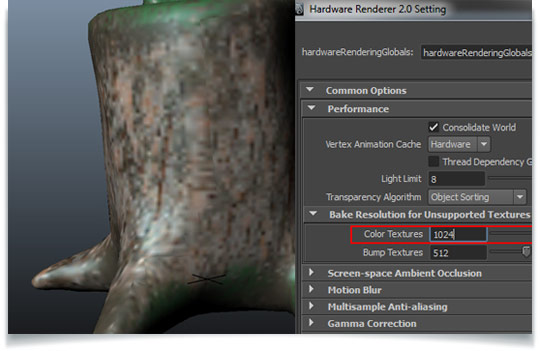
Ashraf Aiad shows how to fix the Ptex texture display in Maya. Once sending a file form Mudbox to Maya and using Viewport 2.0, the texture will look pretty low quality. The soution is quick and comes in two steps by changing the viewport 2.0 settings, and by telling Maya to respect that change. For more information on How to Fix the Ptex Display in Maya, check out the post on Ashraf Aiad’s site.
3Dmayamaya texturing tutorialsmaya tutorials
How to Fix the Ptex Display in Maya
lesterbanks
3D, VFX, design, and typography. Twenty year veteran instructor in all things computer graphics.
Related Posts
3DArticles
Creator Spotlight: Ilija Brunck
Brent ForrestApril 21, 2026
3DanimationArticlescomputersRenderManvfx
Siggraph Asia 2024
Siggraph Asia 2024
Brent ForrestDecember 13, 2024
mayaMaya Animation Tutorialsmaya tutorials
A Complete Guide to Walk Cycle Animation
lesterbanksApril 30, 2024